User Guide
A complete tutorial regarding how to use GoSurvey. We have covered and explained everything related to the working of GoSurvey and its features.

Randomization
How to Set Option Randomization?
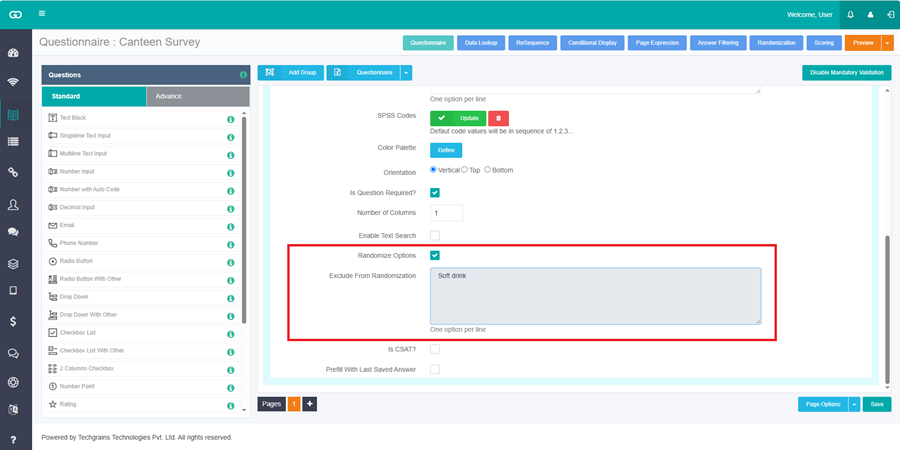
Option randomization shuffles the answers of one question. Expand the question and select Randomize Options. This is available on Radio Button, Check Box, Drop Down, and Ranking.
To keep some answers in place, use Exclude From Randomization. This box appears after Randomize Options is selected. Enter one option on each line. Each line must match an option on the question. Example: put Other on its own line so Other stays at the end while the other options shuffle.
Save the questionnaire.
How to Set row and column randomization?
Expand a grid question.
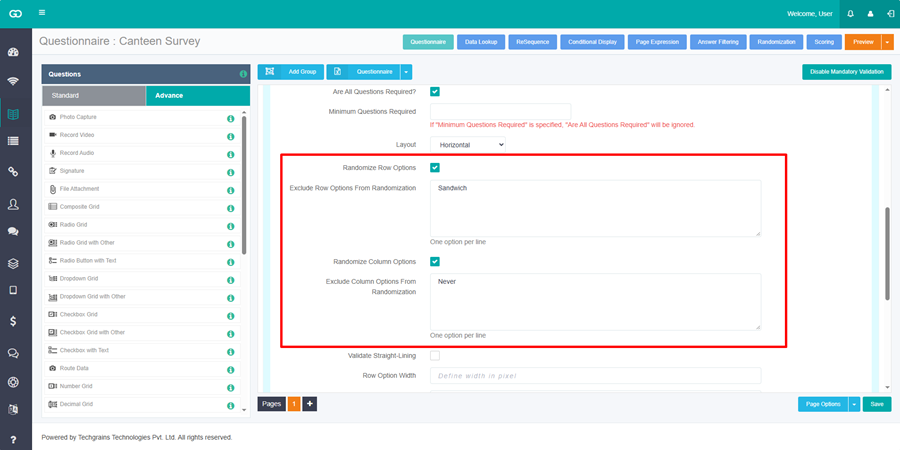
- Randomize Row Options shuffles the rows. Exclude Row Options From Randomization appears after it is selected. Enter one row on each line.
- Randomize Column Options shuffles the columns. Exclude Column Options From Randomization appears after it is selected. Enter one column on each line.
Radio Grid and Check Box Grid have both. Ranking has Randomize Rows. On a Web Survey, Dropdown Grid and Number Grid have Randomize Row Options and Randomize Column Options.
On a Composite Grid, open the column settings. Option columns have Randomize Options and Exclude From Randomization.
Save the questionnaire.
How to set question and group randomization?
This shuffles questions, or whole groups, on the same page. Items with the same block color change order with each other. Items with no color, or a different color, stay in their own set.
Step 1:
Open the survey questionnaire and click Randomization at the top.
Step 2:
On a Portrait survey, click Questions. On a Landscape survey, the list is already the question list.
Step 3:
On a Portrait survey, click the page number under Pages.
Step 4:
In the Block column, choose the same color for the questions or groups that should shuffle together. A group is listed by its group title. A question that is not in a group is listed by its question text. Leave the color blank for an item that should stay out of that block.
Step 5:
Click Save.
Example: on page 2, Question 1, Question 3, and Question 5 should change order. Give those three rows the same color, such as Red. Each respondent then sees those three questions in a different order. The other questions on that page stay in place.
The same color rule applies to groups. Give Shopping behavior and Qualification & Professional info the same color, and those two groups change order with each other.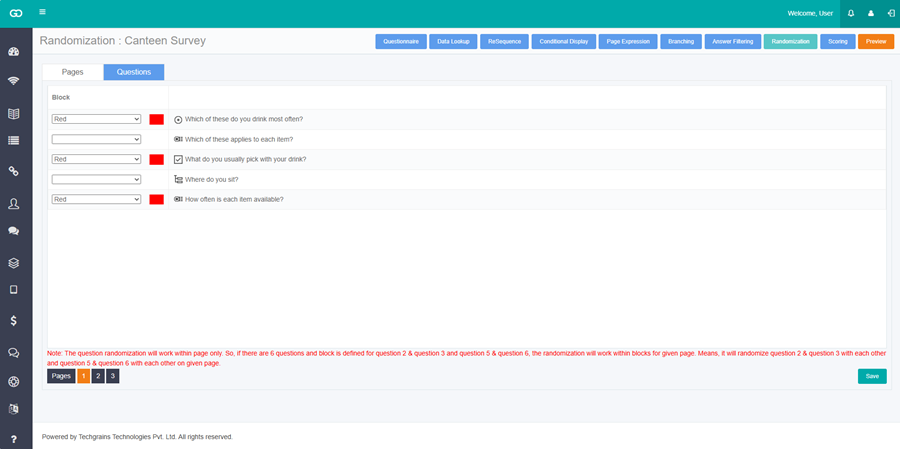
Question randomization works only within the page. If question 2 and question 3 are one color, and question 5 and question 6 are another color, each pair shuffles on its own.
How to set page randomization?
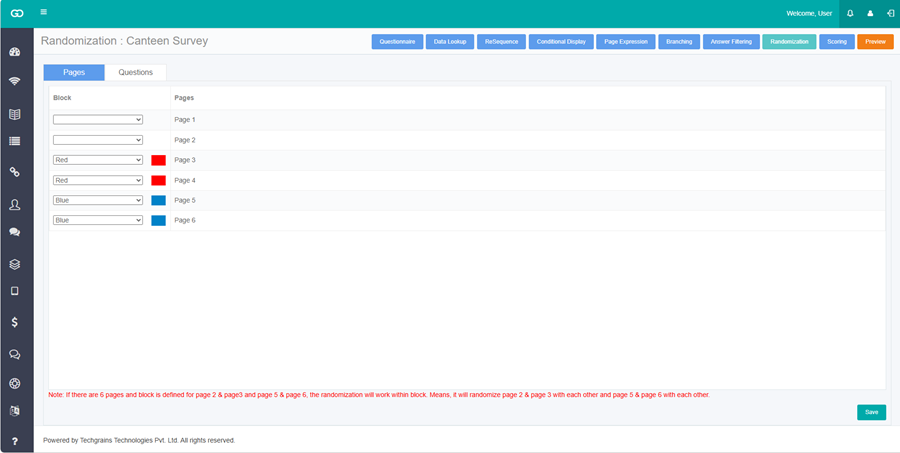
Page randomization is on a Portrait survey. It shuffles whole pages that share a block color.
Step 1:
Open the survey questionnaire and click Randomization.
Step 2:
Open the Pages tab. The rows are Page1, Page2, and so on.
Step 3:
In the Block column, choose the same color for the pages that should shuffle together.
Step 4:
Click Save.
Example: Page 3 and Page 4 are Red. Page 5 and Page 6 are Blue. Page 3 and Page 4 change order with each other. Page 5 and Page 6 change order with each other. They do not mix across the two colors.