User Guide
A complete tutorial regarding how to use GoSurvey. We have covered and explained everything related to the working of GoSurvey and its features.

Answer Piping
Answer piping is a feature in GoSurvey that lets you pipe or insert the option chosen in a previous question to a question on the next page.
Set a Variable Name on the source question, then place that name in double braces in the question that should show the answer.
Let's understand it with a short scenario.
Say you have a question -
Which is your favourite brand?
- Puma
- Reebok
- Adidas
- Skechers
- Nike
Suppose in the very next question you want to ask a question based on the option selected in the above question.
What do you like the most in Skechers?
What if a person selects any other option than Skechers? You can use Answer Piping here which simply pipes or passes the option selected in a previous question to the next question automatically.
Please note, only the following question type supports Answer Piping:
- Singleline Text Input
- Number Input
- Decimal Input
- Date
- Date & Time
- NPS
- Number Point
- Phone Number
- 5 star rating
- Radio Button
- Radio Button with Other
- Drop-down
- Drop-down with Other
- Yes/No
- True/False
- Male/Female
Step 1:
Open the survey questionnaire.
Step 2:
Add the source question and Set Variable Name.
This question must stay before the question that uses the answer. It can be on the same page or on an earlier page.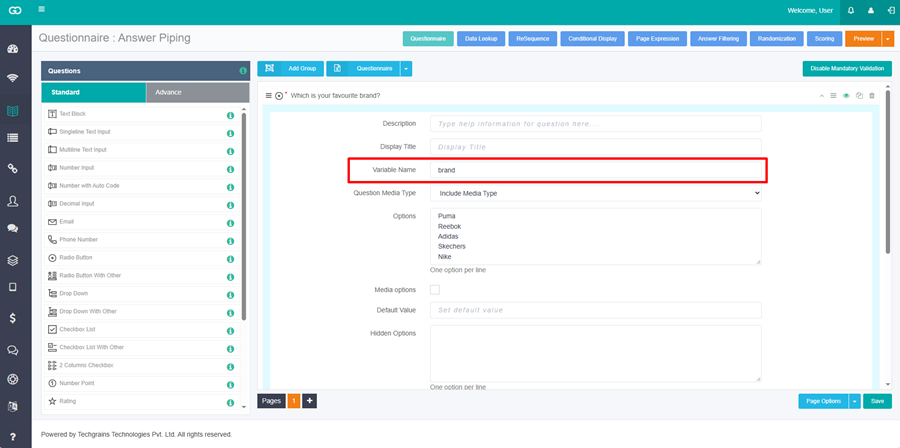
Step 3: Add the next question. Use Variable Name in the question text like - What do you like the most in {{brand}}?
{{brand}} is replaced with the brand the respondent selected. The options stay Price, Quality, Design, and Comfort. You can place the braces anywhere in the sentence. You can use more than one variable in the same question.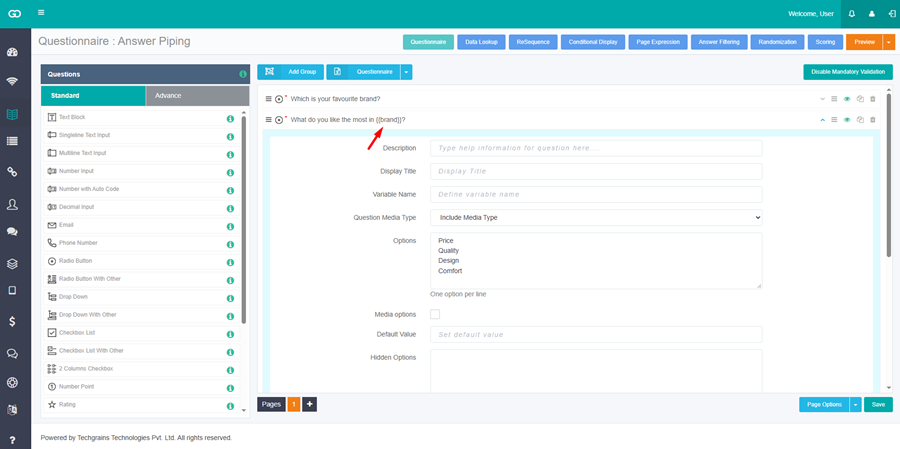
Step 4:
Save and Publish the survey.
A respondent who selects Skechers sees: What do you like the most in Skechers? The choices are Price, Quality, Design, and Comfort.